
MCP Server
ThreadHound exposes a Model Context Protocol (MCP) server so you can connect an LLM client — Claude Code, Claude Desktop, claude.ai, Cursor, or your own agent — directly to your community data. Once connected, the model can list and search conversations, read messages, look up members, run analytics reports, and manage knowledge-base documents on your behalf.
Connecting to Claude (no API key required)
Claude Desktop / claude.ai (sign in with your browser)
These clients support a one-click Connect button — no API key needed. You sign in to ThreadHound in your browser and approve the connection.
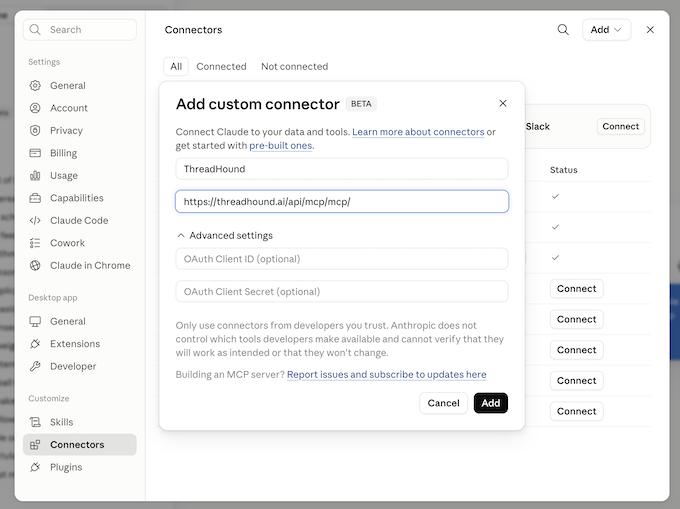
- Go to Settings → Connectors → Add custom connector.
- URL:
https://threadhound.ai/api/mcp/mcp/ - Leave authentication set to the default and click Add.
- In the next window, click Connect. A browser window opens ThreadHound's sign-in page.
- Sign in with your ThreadHound account and approve access. The connector is now linked to your account — it can access every community you belong to, with your role in each.
Connecting to other clients (API key required)
Get an API Key
- Log in to the ThreadHound web app.
- Go to Profile → API Keys → Create key.
- Copy the key. Keys look like
thk_followed by 32 hex characters.
Connect Your Client
https://threadhound.ai/api/mcp/mcp/ — with a trailing slash.Claude Code (CLI / IDE)
claude mcp add --transport http threadhound \
  https://threadhound.ai/api/mcp/mcp/ \
  --header "Authorization: Bearer thk_YOUR_KEY_HERE"
Cursor and other JSON-configured clients
Add to your MCP config (e.g. .cursor/mcp.json):
{
  "mcpServers": {
    "threadhound": {
      "type": "http",
      "url": "https://threadhound.ai/api/mcp/mcp/",
      "headers": {
        "Authorization": "Bearer thk_YOUR_KEY_HERE"
      }
    }
  }
}
Anthropic API (MCP connector)
Building your own agent? Pass the server directly in a Messages API call:
{
  "mcp_servers": [
    {
      "type": "url",
      "url": "https://threadhound.ai/api/mcp/mcp/",
      "name": "threadhound",
      "authorization_token": "thk_YOUR_KEY_HERE"
    }
  ]
}
Testing with MCP Inspector
MCP Inspector is a handy way to explore the server interactively before wiring it into an agent:
npx @modelcontextprotocol/inspectorSet the transport to Streamable HTTP, the URL to the endpoint above, and add the Authorization header. You can then list the available tools and invoke them interactively.
Asking Your First Questions
Once connected, you talk to your community data in plain English. Some prompts to try:
💡 Good to Know
- •Message truncation: message bodies are truncated to 1,000 characters, with a flag indicating when truncation happened.
- •Privacy: member handles (e.g. phone numbers) are partially obfuscated, exactly as in the web UI.
- •Errors are instructive: invalid category names, unknown ids, missing roles, and quota exhaustion come back as readable tool errors that tell the model (and you) what a valid call looks like.
- •Working with attachments: messages listed by
list_messagescarry any files sent with them. Each entry has anattachmentIndex, andhasStoredFilesays whether the file can be fetched. Passing that index toget_attachment_download_urlreturns a temporary link to the file itself — nothing is signed until a specific file is asked for. Images, voice notes and documents also come with an AI summary of their contents; video never does, because sending video to an AI model would be prohibitively expensive, so watching a downloaded video is the only way to know what it shows.
get_attachment_download_url lasts one hour and needs no further authentication, so anyone it is passed to can fetch that file. Treat it like the file itself, and ask for a fresh link rather than reusing an old one.Troubleshooting
| Symptom | Likely cause |
|---|---|
| 401 from the endpoint | Missing, invalid, or revoked API key — or wrong header format (must be Authorization: Bearer thk_…). For a browser-connected (OAuth) client this is normal on first connect and triggers the sign-in prompt; if it keeps re-prompting, your session expired — disconnect and reconnect the connector. |
| 404 from the endpoint | Wrong path — it must be /api/mcp/mcp/ including the trailing slash. |
| Tool error “not a member of this community” | The community id doesn't belong to this key's user — ask your agent to list your communities to see which ones the key can access. |
| Tool error about roles | Analytics reports and document upload/delete need an admin or owner role in that community. |
| Semantic search returns nothing | The community's AI credit quota may be exhausted — retry with a non-semantic search type, or check the response's notes for which retrievers actually ran. |
Next Steps
🔐 Authentication
Learn how to create, manage, and revoke your ThreadHound API keys.