
Getting Started
This guide will walk you through making your first API calls to fetch communities, chat groups, and messages from ThreadHound.
Prerequisites
- ✓A ThreadHound account with at least one community
- ✓An API key (see Authentication)
- ✓A tool for making HTTP requests (curl, Postman, or your preferred language)
Core API Endpoints
Here are the fundamental endpoints to get started with the ThreadHound API:
| Method | Endpoint | Description |
|---|---|---|
| GET | /api/v1/community | List all communities you have access to |
| GET | /api/v1/community/{communityId}/chatgroup | List chat groups in a community |
| GET | /api/v1/chatgroup/{chatgroupId} | Get details of a specific chat group |
| GET | /api/v1/chatgroup/{chatgroupId}/displaychatthread | List threads with AI-enriched summaries |
| GET | /api/v1/chatgroup/{chatgroupId}/displaychatmessage | List messages with author info and reactions |
| GET | /api/v1/chatgroup/{chatgroupId}/search | Semantic search across threads and messages |
v1. Requests to /api/v{number} pin to a particular version. Requests without a version number are routed to the latest API and can produce non-deterministic results if the latest version changes.Error Responses
API errors return standard HTTP status codes:
No valid API key or session provided. Check that your X-API-Key header is correct.
Valid authentication but insufficient permissions. Your API key may not have access to the requested resource.
Rate limit exceeded. Wait and retry with exponential backoff.
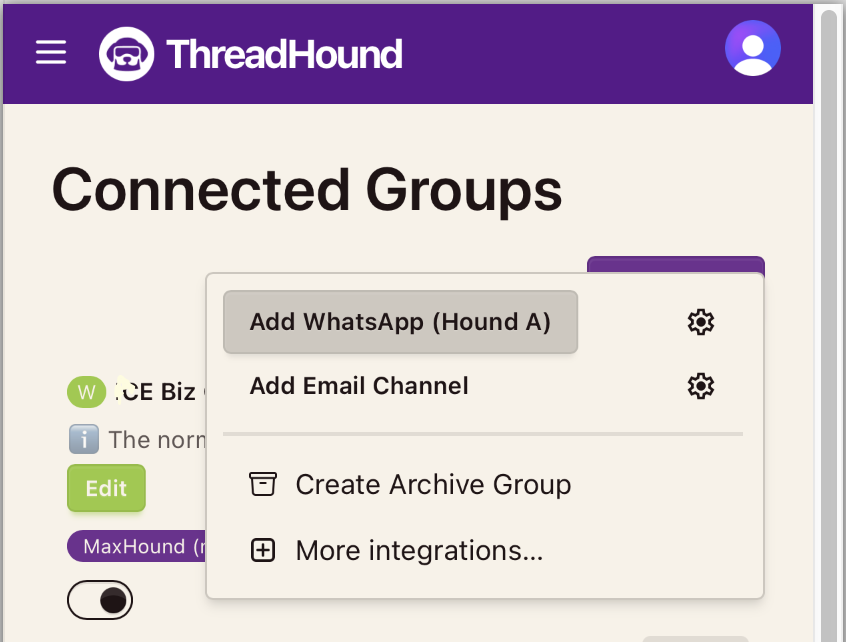
Add a Chat Group using the ThreadHound dashboard
Use the ThreadHound dashboard to add a new chat group. Ensure you have added the Hound so that Indexing is enabled.
List Your Thread Hound Communities
Think of communities as large umbrella projects that hold your chat groups, documents, members and more. Start by fetching all your communities your API key has access to. This returns an array of community objects with their IDs and names.
curl -X GET "https://api.threadhound.ai/api/v1/community" \
-H "X-API-Key: your_api_key_here"[
{
"_id": "community_abc123",
"name": "The Jones Community",
"description": "Our main community hub",
"CreationDate": "2024-01-15T10:30:00Z"
},
{
"_id": "community_def456",
"name": "Product Feedback Group",
"description": "Customer feedback and suggestions",
"CreationDate": "2024-02-20T14:15:00Z"
}
]List Chat Groups
Use the community ID from step 2 to list all chat groups (WhatsApp groups, channels, etc.) within that community.
curl -X GET "https://api.threadhound.ai/api/v1/community/community_abc123/chatgroup" \
-H "X-API-Key: your_api_key_here"[
{
"_id": "group_xyz789",
"name": "General Discussion",
"community": "community_abc123",
"description": "Main group for community chat",
"isDirectMessageGroup": false
},
{
"_id": "group_uvw012",
"name": "Announcements",
"community": "community_abc123",
"description": "Official announcements only",
"isDirectMessageGroup": false
}
]?excludeDM=true to filter out direct message groups.Fetch Threads with AI Summaries
Get conversation threads from a chat group. ThreadHound automatically groups related messages into threads and enriches them with AI-generated summaries, sentiment analysis, and keywords.
curl -X GET "https://api.threadhound.ai/api/v1/chatgroup/group_xyz789/displaychatthread?limit=10" \
-H "X-API-Key: your_api_key_here"{
"data": [
{
"id": "thread_001",
"title": "Best practices for onboarding?",
"firstMessageDate": "2024-06-01T09:00:00Z",
"lastMessageDate": "2024-06-01T11:30:00Z",
"messageCount": 12,
"summary": "Discussion about creating a welcoming experience for newcomers...",
"sentiment": "positive",
"isQuestionLed": true,
"questionResponseStatus": "answered"
}
],
"pagination": {
"page": 1,
"limit": 10,
"total": 156,
"totalPages": 16
}
}Fetch Messages for a Thread
Using the thread ID from step 4, retrieve all messages within that specific thread. This includes author information, reactions, and quoted message previews.
curl -X GET "https://api.threadhound.ai/api/v1/chatgroup/group_xyz789/displaychatmessage?chatThreadId=thread_001" \
-H "X-API-Key: your_api_key_here"{
"data": [
{
"id": "msg_001",
"messageDate": "2024-06-01T09:00:00Z",
"messageText": "What are the best practices for onboarding new members?",
"isSystemMessage": false,
"isBotMessage": false,
"authorInfo": {
"id": "member_001",
"handle": "sarah_m",
"fullName": "Sarah Mitchell"
},
"reactions": [
{ "emoji": "👍", "count": 5 }
],
"chatThreadSummary": {
"id": "thread_001",
"title": "Best practices for onboarding?"
}
},
{
"id": "msg_002",
"messageDate": "2024-06-01T09:15:00Z",
"messageText": "Great question! We usually start with a welcome message...",
"isSystemMessage": false,
"isBotMessage": false,
"authorInfo": {
"id": "member_002",
"handle": "alex_j",
"fullName": "Alex Johnson"
},
"reactions": [
{ "emoji": "❤️", "count": 3 },
{ "emoji": "🙌", "count": 2 }
],
"quotedMessageText": "What are the best practices for onboarding...",
"quotedMessageAuthor": "Sarah Mitchell"
}
],
"pagination": {
"page": 1,
"limit": 50,
"total": 12,
"totalPages": 1
}
}Common Query Parameters
Many endpoints support these standard parameters for filtering and pagination:
| Parameter | Type | Description |
|---|---|---|
page | integer | Page number for pagination (1-indexed, default: 1) |
limit | integer | Items per page (default: 50, max: 100) |
range | string | Date range filter: last7Days, last30Days, last3Months, last6Months, allTime |
sort | string | Sort order: asc or desc |
chatThreadId | string | Filter messages to a specific thread |
Next Steps
Now that you've made your first API calls, explore more advanced features:
🔍 Search API
Use semantic search to find relevant threads and messages across your community.